
Free download: https://edocation.ca/wp-content/uploads/2021/01/Edocation-Default-Profile.zip
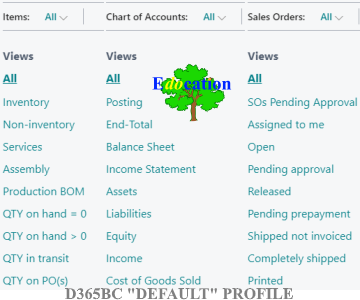
In this post, find the link to download the free “Default” Profile1 for Microsoft Dynamics 365 Business Central (D365BC). It features refined Ribbons, predefined Filters and uncluttered Lists and Pages.
To learn more about D365BC, including its financial reporting, budgeting and inventory capabilities, the industries and sectors it serves, its license types and their prices; to familiarize with the implementation process and estimate implementation cost, visit the corresponding page or hire a consultant.
Profiles in D365BC make work more efficient and effective. Edocation team has taken this one step further and introduced a number of useful enhancements to make work even more convenient and productive for Users in many different business functions, including accounting, sales, purchases, inventory, projects, management, etc. The areas we have enhanced include:
- Lists – for example, it is possible to see by default who each Sales Quote, Order, Invoice or Order are assigned to, see more columns which are conveniently and consistently organized across different Lists in the system.
- Pages – useful Fields (e.g. for intercompany transactions) are exposed by default; other Fields that are irrelevant in the Canadian context (e.g. DIOT, 1099) are hidden to unclutter the view.
- Journals – Posting Groups that are rarely used in Journals are hidden; EFT-related functions have been grouped under the same “Bank” Group to save time and for convenience.
- Filters – for instance, it is possible to see all the Sales Order and Purchase Orders that have been approved; Sales Quotes that expire within a week; Sales Shipments that are due soon – all within one click. Filters are arranged in a similar order across different Lists.
- Role Center – the Company Hub is exposed by default on the Home Page to allow navigating conveniently through all the environments and Companies.
- Other features – FastTab Fields are organized similarly on different Pages to improve Users’ experience working with different Pages; the Dates on Sales and Purchase Orders are arranged logically; some useful Pages and Ribbons are simplified, etc.
The Lists, Pages and Journals that have been enhanced in Edocation “Default” Profile include:
+ LISTS
- Chart of Accounts
- G/L Registers
- General Ledger Entries
- Tax Jurisdictions
- Vendors
- Purchase Quotes
- Purchase Orders
- Purchase Invoices
- Purchase Credit Memos
- Posted Purchase Receipts
- Posted Purchase Invoices
- Posted Purchase Credit Memos
- Customers
- Sales Quotes
- Sales Orders
- Sales Invoices
- Posted Sales Shipments
- Sales Credit Memos
- Posted Sales Invoices
- Posted Sales Credit Memos
- Deposits
- Items
- Item Ledger Entries
- Jobs
- Assembly Orders
- Posted Assembly Orders
+ PAGES (CARDS)
- Home (Role Center)
- General Ledger Setup
- G/L Account
- Purchases & Payables Setup
- Vendors
- Purchase Quote
- Purchase Order
- Purchase Invoice
- Purchase Credit Memo
- Posted Purchase Invoice
- Posted Purchase Credit Memo
- Sales & Receivables Setup
- Customers
- Sales Quote
- Sales Order
- Sales Invoice
- Sales Credit Memo
- Posted Sales Invoice
- Posted Sales Credit Memo
- Deposit
- Item
- Job
- Assembly Order
+ JOURNALS
- General
- Recurring General
- Purchase
- Payment
- Sales
- Cash Receipt
- Item
- Item Revaluation
- Physical Inventory
- Job
- Job G/L
- Fixed Asset
- Fixed Asset G/L
This “Default” Profile has been optimized for the people with these roles:
✓ accountants;
✓ business managers;
✓ warehouse (inventory) managers;
✓ accounting managers;
✓ controllers;
✓ sales order managers;
✓ purchasers (procurement department);
✓ project managers;
✓ technicians (workers);
✓ payment (EFT, Computer Cheque, etc.) processors;
✓ sales people, etc.
This video shows how to import the Profile into the system:
If you would like to discuss your business objectives and achieve your business goals even more efficiently and effectively, hire a consultant.
1. Microsoft Dynamics 365 Business Central (D365BC) License Calculator
2. Easy & Quick Financial Reporting: Microsoft Dynamics 365 Business Central
3. Microsoft Dynamics 365 Business Central: Inventory Capabilities
Further Reading
A. Manage Profiles.
B. Assign Permissions to Users and Groups.
1 This Profile is based on Microsoft “Accountant” Profile. The provided the enhancements (from our point of view) can help Users improve their experience with D365BC. Edocation team has tested successfully this Profile in version 17 of D365BC. Only out-of-the-box (original) D365BC tools were used and no Extension is required. The Profile is available as is. Edocation Corp. does not assume any responsibility for how it is downloaded, how it works, is used or any related issues. It is recommended that each User should test the Profile in a Sandbox environment prior to importing it to the Production environment. The enhancements, that are a part of this Profile, are provided by Edocation free of charge and must not be resold. The Profile is intended for end Users only. If you have questions about this Profile or would like to discuss your ERP business requirements with one of our Microsoft certified specialists, contact us.